YouTube Premium Revenue for Creators in 2026 and How It Actually Works
Posted on November 3, 2026 by Jason Caldwell
Open YouTube Studio, click Analytics, then Revenue, and you’ll probably find a small line that says YouTube Premium. For a lot of channels it sits there for months, adding a few dollars here and a few dollars there, and the creator never stops to ask where the money comes from.
That’s a missed chance. YouTube Premium revenue for creators runs on rules that are completely different from ad revenue, and those rules changed in August 2026. YouTube shared two numbers it had never published before, 30% and 60%. Plenty of articles still repeat an older figure that tells only part of the story.
This guide explains how the money moves from a viewer’s monthly fee to your account. You’ll see what the new numbers mean, who qualifies, how to find your share in YouTube Studio, and what actually moves it. I’ll also answer a question I get a lot, which is whether paid promotion can raise it. The honest answer is more interesting than a simple yes or no.
Why So Many Creators Earn From Premium Without Knowing It
Premium is easy to ignore. Nobody sees an ad impression, nobody gets a notification, and the number is usually small next to ad income. It sits in your dashboard as one more line.
But it’s real money from a real group of viewers, and for some channels it’s a meaningful slice of the total. YouTube says that, on average, partners earn more when someone signs up for Premium than they did when that person watched ads. That comes from YouTube’s 2026 data. The viewer who pays to skip ads is, on average, worth more to you.
It Pays Differently From Ads
Ad revenue follows ad impressions. Premium doesn’t. Members pay a monthly fee, and YouTube pools part of it. Your share depends on how much of the members’ watch time lands on your videos. No ads are involved, so there’s no CPM, no advertiser mood, and no ad blocker problem.
That’s why two channels with the same view count can earn very different amounts from Premium. One holds members for twenty minutes a session. The other gets a quick click and an exit.
Why It Matters More This Year
YouTube’s August 10, 2026 announcement expanded Premium Lite to every country that has Premium, published the pool percentages, and raised the entry bar for new creators. The new terms take effect on February 1, 2027.
If Premium income is part of your plan, or you’re still working toward the Partner Program, the details below affect you directly.
How YouTube Premium Pays Creators, Step by Step
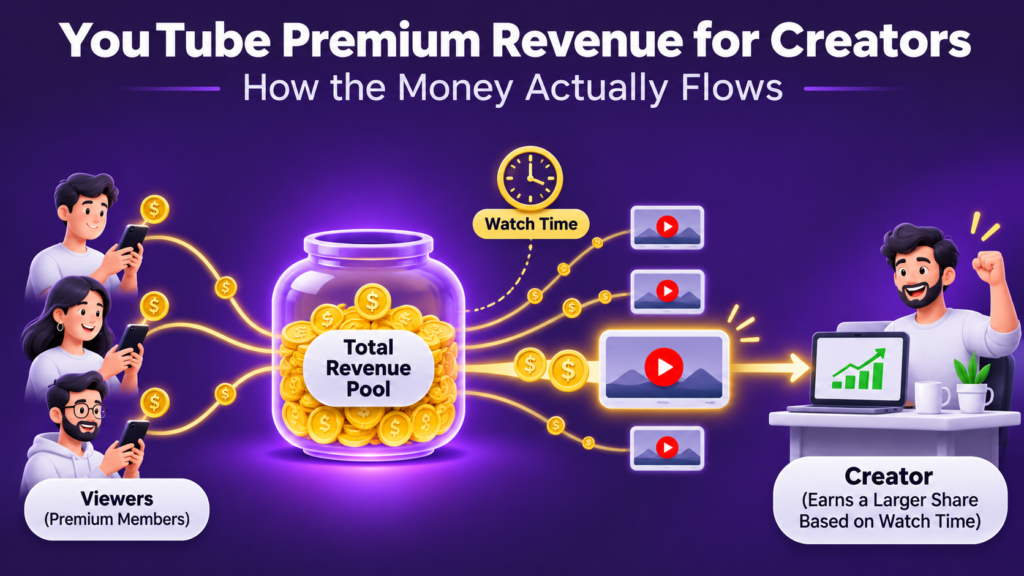
YouTube’s own graphic on how YouTube Premium revenue works shows a simple flow. Pool the money, split it by watch time, apply a revenue share, then pay. Here’s what each step means in plain language.
Step 1: The Money Goes Into a Pool for Each Plan
Every plan has its own pool. There’s one for Premium and one for Premium Lite. YouTube takes the net subscription revenue for that plan and sets aside a percentage for creators. We’ll look at those percentages in the next section.
Step 2: The Pool Is Split by Watch Time and Views
The pool isn’t paid out member by member. It’s shared across all eligible creators based on member watch time and views. If your videos account for a tiny slice of all the time members spend watching, you get a tiny slice of the pool. If they account for a bigger slice, you get more.
Step 3: Your Revenue Share Gets Applied
From the amount allocated to you, creators receive 55% for long-form videos and 45% for Shorts. That’s the figure you’ve probably seen quoted as the 55% rule. It’s real, but it’s the last layer, not the first.
Step 4: You Get Paid With Your Other Earnings
Premium revenue shows up alongside your other YouTube earnings and is paid through your AdSense account. In most countries, payments go out monthly once you pass AdSense’s payment threshold. Your AdSense payment settings are the place to check the exact details for your country.
The 30% and 60% Numbers Most Articles Leave Out
For years, the standard line on YouTube Premium revenue for creators was that they get 55% of it. You’ll still see that on plenty of blogs. It isn’t wrong, but it describes only one layer.
In its August 2026 announcement, YouTube said creators share a dedicated pool worth 30% of net subscription revenue for Premium and 60% for Premium Lite. YouTube says that allocation factors in the cost of running and promoting the service, including what it pays music partners.
What the Layers Add Up To
Put the two layers together and you get the effective share. I worked these out by multiplying YouTube’s published percentages.
| Plan | Creator Pool | Long-Form Effective Share | Shorts Effective Share |
| YouTube Premium | 30% of net subscription revenue | 16.5% (30% x 55%) | 13.5% (30% x 45%) |
| YouTube Premium Lite | 60% of net subscription revenue | 33% (60% x 55%) | 27% (60% x 45%) |
Treat the last two columns as a way to understand the structure, not as your payout. You’re sharing that slice with every other eligible creator, and the split follows watch time.
A Worked Example With Made-Up Numbers
Say the net Premium revenue for a month is $100 million. The 30% pool is $30 million. Your long-form videos account for 0.001% of all Premium watch time that month, so your allocation is $300. You then receive 55% of that, which is $165.
These numbers are invented to show the mechanics. YouTube doesn’t publish real pool sizes or individual shares, so your own dashboard is the only place to see actual figures.
YouTube Premium Lite Revenue Share and What It Changes
Premium Lite is the part of the August announcement that got the least attention, and I think it deserves more.
What Premium Lite Is
Lite is a cheaper plan with uninterrupted, offline, and background viewing of most content. YouTube is expanding it to every country where Premium is offered.
Why the Lite Pool Is Larger
The Lite pool is 60% of net subscription revenue, compared with 30% for full Premium. YouTube explains that its allocations factor in the costs of running the service, including what it pays music partners. Music Business Worldwide describes Lite as the tier that pays for the least music, which would fit that logic.
I’d read it as a structural difference, not a bonus. The percentage is higher because less of the fee goes to other costs.
What It Means for Your Channel
More Lite members in more countries means more total subscription money flowing into the creator pools. Whether that raises your own payout depends on how much of their watch time lands on your videos.
YouTube says it expects to pay creators more in 2027 than in 2026. That’s a total across the whole program, not a promise for any single channel.
Who Can Earn From Premium Revenue, and What Changes in 2027
YouTube Premium revenue sharing belongs to the full Partner Program, the same tier that earns ad revenue. The expanded tier at 500 subscribers, which covers fan funding and shopping, doesn’t include it.
The Current Entry Requirements
Today, a new channel needs 1,000 subscribers and either 4,000 qualified public watch hours in the last 365 days or 10 million qualified Shorts views in the last 90 days.
The New Requirements From February 1, 2027
For new applicants, the bar rises to 8,000 qualified watch hours in 365 days, or 20 million qualified Shorts views in 90 days. YouTube’s announcement doesn’t mention changing the subscriber requirement. Creators already in the program aren’t affected by the new entry bar.
What Changes for Shorts Revenue
From February 1, 2027, channels need 10 million qualified Shorts views over the last 90 days to be eligible for ads and subscription revenue sharing on Shorts. Channels below that stay in the Partner Program. They keep earning on long-form content. Shorts revenue sharing resumes automatically once they cross the line again.
| Item | Now | From February 1, 2027 |
| Full YPP entry, watch hours path | 4,000 qualified hours in 365 days | 8,000 qualified hours (new applicants) |
| Full YPP entry, Shorts path | 10 million qualified Shorts views in 90 days | 20 million qualified Shorts views (new applicants) |
| Expanded tier (fan funding, shopping) | Unchanged | Unchanged |
| Shorts ad and subscription revenue | Shared once you’re in YPP | Needs 10 million qualified Shorts views in the last 90 days |
Why YouTube Premium Watch Time Is the Whole Game
Since your share follows watch time, everything about Premium revenue comes back to one question. How much of a member’s time do your videos earn?
Members Watch Differently
People who pay to remove ads tend to settle in. AIR Media-Tech ran a sample model that assumes Premium viewers make up about 5% of views and watch roughly three times longer. That would put them at around 15% of your watch time.
Those are their assumptions, not YouTube’s numbers. But the point holds. A small group of viewers can matter more than their headcount suggests.
Offline and Background Viewing
Premium includes downloads and background play. Creator guides report that watch time from both counts toward your share. If that’s right, content people listen to with the screen off, like talks, interviews, and long music sessions, can do well. YouTube’s help pages are the place to confirm the current rules.
Back-Catalog Videos Keep Earning
Because pay follows watch time, an older video that members keep coming back to keeps adding to your share. A spike from a viral ad-driven video fades. A library people rewatch doesn’t.
Where to Find Your Premium Revenue in YouTube Studio
You can’t improve a number you’ve never looked at. Here’s how to find yours.
Finding the Line
Open YouTube Studio, go to Analytics, and click the Revenue tab. Look for YouTube Premium listed as a revenue source, separate from Watch Page ads. Labels move around as YouTube updates Studio, so if you can’t spot it, scan the tab for the word Premium. If your channel isn’t in the full Partner Program yet, you won’t see it. The YouTube Analytics Explained guide walks through the rest of YouTube Studio if you want to go deeper.
What to Check Once You Find It
Start with Premium as a share of your total revenue. That tells you how much it already matters to your channel. Then look at your top videos by Premium revenue, which are often different from your top videos by views.
Finally, watch the trend over 90 days. A steady rise means members are finding and finishing your content. A flat line on a growing channel usually means your new videos aren’t holding that audience.
How to Grow Your Premium Share Without Changing Your Niche
You don’t need a new topic to grow your YouTube Premium revenue. You need videos that members watch longer and come back to.
Build for Watch-Through
Open the audience retention graph on your five best videos. Find the point where most viewers leave and fix that stretch in your next upload. Every extra minute people stay is a minute added to the pool you share in.
Make Videos Worth Coming Back To
Tutorials, deep dives, long interviews, and reference videos get rewatched. Quick reaction clips don’t. If you’re deciding between two ideas, pick the one someone might want to open again in three months.
Use Playlists and Series
A viewer who finishes one video and sees the next one lined up keeps going. Group related videos into playlists, and point to the next video in your end screens. Longer sessions mean more watch time per member.
Know the Limits of Shorts
Shorts do share in the Premium pool, at the 45% rate. But from February 2027 you’ll need 10 million qualified Shorts views in 90 days to be eligible for Shorts revenue sharing. For most small channels, Shorts work best as a way to bring people to the long-form videos that earn the bigger share.
Can Paid Promotion Raise Your Premium Revenue?
This is the question I hear most from creators who’ve already tried advertising their videos. The short version is that it works indirectly, and only in one situation.
Premium Members Mostly Don’t See Ads
YouTube Premium removes ads from most videos. A Premium member will mostly never see your in-stream ad campaign. That means the views you pay for come largely from people who aren’t Premium members, and paid promotion doesn’t buy Premium watch time directly.
Where It Can Help Indirectly
What promotion can do is give a good video the engagement data it needs to be recommended more widely. Recommendations reach everyone, Premium members included. If real viewers stay and the video starts gaining organic traction, some of that traction will come from Premium members.
It’s an indirect effect, and it depends entirely on the video holding attention. A video that loses people in ten seconds won’t earn anything from either group.
Check What You Paid For
If you do run promotion, verify it. In YouTube Studio, open Analytics, click Reach, and check Traffic sources for YouTube advertising. Real campaign views show up there with watch time attached. You can read more about How Manual Targeting YouTube Promotion on Vedzzy Works if you want to see how a hand-built campaign is set up, and Are YouTube Promotion Services Safe covers what to ask before you pay anyone.
If You’re a Musician, Read This Part Separately
Music creators run into a wrinkle here, and it’s easy to mix up two different income streams.
Video Watch Time Is Not the Same as Music Streams
The Premium revenue in YouTube Studio is tied to watch time on videos in your Partner Program channel. When someone streams your official track on YouTube Music, that income usually runs through your distributor, label, or publisher as royalties instead. They’re separate systems with separate reports.
Check With Your Distributor
Rules for music vary by distributor and by how your catalog is set up, so ask yours how YouTube Music streams and Content ID claims are paid out. Then look at your Studio Revenue tab for the Premium share from your own videos. Add the two together to see the full picture.
Mistakes Creators Make With Premium Revenue
Repeating the 55% Line as the Whole Story
Plenty of creators tell their audience that YouTube gives them 55% of Premium money. It’s the last layer of a longer process. Quoting it alone overstates what reaches your account.
Chasing Clicks Instead of Watch Time
A thumbnail that gets clicks but loses viewers in the first minute does nothing for your Premium share. Members pay for a smoother experience, and they reward videos that deliver it with their time.
Never Opening the Revenue Tab
I’ve talked to creators who didn’t know the line existed. Check it monthly. If you can’t see it, that’s a clue about your Partner Program status.
Assuming the 2027 Changes Hit Existing Members
The higher entry bar applies to new applicants. If you’re already in the program, your entry status doesn’t change. What you should do is review and sign the new terms in YouTube Studio ahead of the February 1, 2027 effective date.
Frequently Asked Questions
How does YouTube Premium revenue for creators work?
Premium members pay a monthly fee. YouTube puts a percentage of the net subscription revenue into a creator pool for each plan, 30% for Premium and 60% for Premium Lite. That pool is shared across eligible creators based on member watch time and views. Creators then receive 55% of their allocation for long-form videos and 45% for Shorts.
How much do creators earn from YouTube Premium?
There’s no fixed rate, because your share depends on how much of all Premium watch time your videos earn. YouTube says that, on average, partners earn more when a viewer signs up for Premium than when that viewer watched ads. That’s based on 2026 performance. For your own numbers, check the Revenue tab in YouTube Studio.
Do I need to be in the YouTube Partner Program to earn from Premium?
Yes, and specifically the full tier that includes ad and Premium revenue sharing. The expanded tier at 500 subscribers covers fan funding and shopping, but not Premium revenue. New applicants face higher entry requirements from February 1, 2027.
Is Premium revenue separate from ad revenue?
Yes. Ad revenue follows ad impressions on your videos. Premium revenue follows the watch time Premium members spend on your videos. In YouTube Studio they appear as separate revenue sources.
Do Shorts earn Premium revenue?
They can. Shorts share in the Premium pool at a 45% rate. From February 1, 2027, a channel needs 10 million qualified Shorts views in the last 90 days to be eligible for Shorts revenue sharing. Channels below that remain in the program and keep earning on long-form content.
What is YouTube Premium Lite and how does it pay creators?
Premium Lite is a lower-priced plan with uninterrupted, offline, and background viewing of most content. It has its own creator pool worth 60% of net subscription revenue, compared with 30% for full Premium. The pool is distributed by member watch time and views, and creators receive 55% for long-form and 45% for Shorts.
Does offline or background viewing count toward my Premium earnings?
Creator guides report that watch time from downloads and background play counts toward your share. I’d treat that as likely but worth confirming. YouTube’s help pages are the right place to check the current rules, since they can change.
When do creators get paid for Premium revenue?
Premium revenue is paid with your other YouTube earnings through your AdSense account. In most countries, payments go out monthly once your balance passes AdSense’s payment threshold. Check your AdSense payment settings for the exact timing and amount in your country.
Will paid promotion increase my Premium revenue?
Not directly. Premium members mostly don’t see ads, so a campaign reaches mostly non-members. What promotion can do is help a strong video gain engagement and organic reach, and recommended placements do reach Premium members. That effect is indirect and depends on whether viewers stay and watch.
Do the 2027 changes affect creators already in the Partner Program?
The higher entry requirements apply to new applicants, so existing members keep their status. Existing members should review and sign the new terms in YouTube Studio before they take effect on February 1, 2027. Shorts revenue sharing also gets a new 10 million view threshold from that date.

Hi, I am Jason, a digital content strategist with 8 years of experience helping YouTube creators and brands grow their channels through data-driven content decisions. I have worked with creators across niches including tech, education, and lifestyle, and specialise in translating YouTube Analytics data into actionable growth strategies.
Categories: YouTube Monetization