How to Write YouTube Video Descriptions That Actually Get More Views in 2026
Posted on July 30, 2026 by Jason Caldwell
Most creators spend hours on their thumbnail. They rewrite the title five times. Then they open the description box and type three sentences — or nothing at all.
That’s where views get left on the table. Knowing how to write YouTube video descriptions properly is one of the most underused growth skills on the platform. It’s not glamorous. It doesn’t feel as creative as filming or editing. But a well-written description changes how YouTube understands your video, how it ranks in search, and whether viewers click when they see it.
Over 720,000 hours of video are uploaded to YouTube every day. The platform supports 2.6 billion monthly active users as of 2026. In that environment, weak metadata gets buried fast. Your description is part of your metadata. It deserves the same care as everything else.
This guide breaks down exactly what to put in a YouTube description, where each element goes, and why it matters for both the algorithm and the real person reading it.
Why Your Description Is More Powerful Than You Think
Here’s something most creators don’t realise. Your description doesn’t just inform viewers. It teaches YouTube what your video is about.
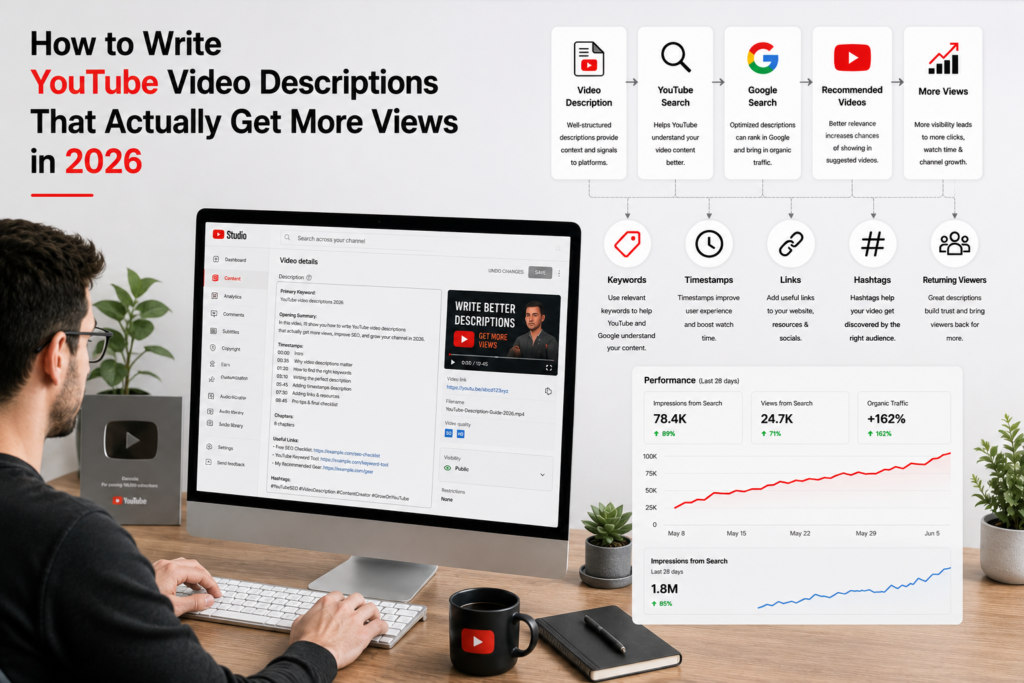
YouTube’s algorithm uses your written description to confirm the “entity” of your content. While the algorithm listens to your audio, it uses your description as a semantic roadmap to anchor your video in the right search results.
That’s a big deal. It means every keyword, phrase, and topic you include in the description gives the algorithm more signal to work with. A detailed, relevant description helps YouTube match your video with the right searchers — and push it to the right recommended feeds.
This is also how your description feeds into how to get more views on YouTube over the long term. It’s not just about showing up in YouTube search. YouTube video descriptions are indexed by Google too. A well-optimised description can put your video in Google’s video results, the Video tab, and even in AI-generated answer boxes. That’s an entire second search engine working for your content — at no extra cost.
The best descriptions serve two audiences: the algorithm for visibility and real viewers for engagement. When you nail both, your videos get discovered more often and watched for longer.
The Most Important Real Estate: The First 150 Characters
Open YouTube on your phone and search for anything. You’ll see a list of videos. Under each title is a short snippet of text. That’s the first part of the video description.
YouTube truncates descriptions after approximately 100 characters in search results and roughly 160 characters below the video player itself. That tiny window is your first impression in search. It’s the YouTube equivalent of a meta description — and most creators waste it completely.
Here’s what a wasted opening looks like:
“Hey guys! Welcome back to my channel. In this video, I’m going to be talking about…”
Nobody reading that in a search result learns anything useful. There’s no keyword. No value proposition. No reason to click.
Here’s what a strong opening looks like:
“In this video, you’ll learn exactly how to write YouTube descriptions that rank in search and bring in more views — step by step.”
That opening uses the primary keyword naturally. It states the value immediately. It gives the viewer a specific reason to click. And it gives YouTube a clear topic signal to work with.
Your opening line needs to hook viewers immediately while including your primary keyword. The first few seconds should clearly tell viewers what they’ll learn and why it’s worth staying.
Write your first 150 characters as if they’re the only thing a viewer will ever see. Because sometimes, they are.
The Full Description Structure That Works
Good descriptions have a clear structure. Each section does a different job. Here’s the layout that works consistently in 2026.
Section 1 — The Hook (First 150 characters)
As covered above — state the keyword, state the value, and give a reason to click. Keep it tight. One to two sentences.
Section 2 — The Expanded Summary (150 to 500 characters)
Below the hook, give viewers more context. What topics does the video cover? What will they be able to do after watching? Who is this video for?
This section doesn’t need to be long. Three to five sentences is enough. Include secondary keywords naturally here — related phrases that viewers might also search for. Don’t stuff them. Write for the reader first. If a keyword fits naturally, use it. If it sounds forced, leave it out.
Place your primary keyword within the first 25 words of the YouTube description. Aim for descriptions averaging 200 words or longer — that format performs better in search discoverability.
Section 3 — Timestamps and Chapters
This section is underused by most creators, and that’s a mistake. Adding timestamps does several things at once.
It improves viewer experience. Someone looking for one specific part of your video can jump straight there rather than scrubbing through. That reduces frustration-driven drop-offs.
It improves SEO. YouTube displays chapters in Google search results as individual clickable links. Each chapter can rank for its own keyword phrase. A 10-minute video with 6 well-labeled chapters essentially has 6 separate ranking opportunities in Google.
It keeps viewers on your video longer. When a viewer knows what’s coming at 6:45, they’re more likely to watch until then. Chapters create curiosity. Curiosity improves retention.
Use keywords in your chapter titles. Include at least 3 chapters per video.
Format:
0:00 Introduction
1:15 Why descriptions matter for SEO
3:30 How to write the first 150 characters
5:45 Timestamps and chapters explained
8:00 Hashtags and what not to do
9:30 Final checklist
Section 4 — Keywords and Context
After your chapters, add a paragraph or two of natural, relevant text. This is where you include supporting keywords, related phrases, and semantic context.
Don’t write this section for robots. Write it as a genuine summary of the video’s content. YouTube’s NLP reads this and uses it to understand what topics the video covers beyond just the title and opening line.
Think about related phrases a viewer might search. If your video is about writing YouTube descriptions, related phrases include “YouTube description tips,” “YouTube SEO 2026,” “how to optimise YouTube videos,” and “YouTube search ranking.” Work those naturally into the text without forcing them.
Adding keywords into your description helps YouTube determine what your video is about and display it on the right search pages. Mention your main topic in the opening paragraph, then weave in related terms throughout. Include your target keywords, but write for humans first.
Section 5 — Links and Resources
Include links to anything genuinely useful. Your most relevant related videos. A playlist that connects to this video’s topic. Your website if viewers might want to visit it.
Be strategic. Don’t list every social media account you have. That’s clutter. Link to what a viewer who just finished watching this video would actually want to click next.
Link to 2 to 3 related videos on your channel. This increases session watch time, which is a significant ranking factor.
When viewers click to another video on your channel right after finishing one, that’s session watch time. YouTube values it because it means your channel kept viewers on the platform. That’s exactly what the algorithm rewards.
Understanding how the YouTube algorithm actually uses your metadata explains why these session signals matter so much for long-term distribution.
Section 6 — Hashtags
Hashtags go at the very bottom of the description. They act as category labels that help the algorithm place your video in the right interest bucket.
Use 3 to 5 highly specific hashtags. If you use more than 15, YouTube ignores all of them. Over-tagging is viewed as a spam signal.
Use hashtags that are specific to your video’s topic — not just broad ones like #YouTube or #Creator. A video about writing YouTube descriptions might use #YouTubeSEO, #VideoDescriptions, #YouTubeTips, #ContentCreator, and #YouTubeGrowth. Each one helps categorise the video more precisely.
Keyword Research for Descriptions: Finding the Right Terms
Writing a great description starts before you open the description box. It starts with knowing which phrases your target viewer actually searches.
Most creators guess at this. The creators who grow systematically don’t guess — they research.
Start with YouTube autocomplete. Type your video topic into the search bar without pressing enter. Look at the dropdown. Every suggestion there is a real search phrase real people type. These are your keyword opportunities.
Then look at what’s already ranking. Search your target phrase on YouTube. Click on the top 3 or 4 videos. Read their descriptions. What phrases do they use? What topics do they cover? What’s missing from their descriptions that you could include in yours?
Tools like TubeBuddy and VidIQ layer search volume and competition data directly onto YouTube’s interface. They show you how many monthly searches a phrase gets and how hard it is to rank for it. For a newer or smaller channel, target phrases with under 35 competition on a 100-point scale. For a more established channel, you can go after higher-competition terms.
For a full breakdown of how to find keyword opportunities before they get competitive, our guide on how to spot trending topics and keywords on YouTube covers the full research process.
How Descriptions Help You Rank on Google — Not Just YouTube
This is the angle that most YouTube SEO guides skip over. Your description doesn’t just help you rank on YouTube. It helps you rank on Google.
YouTube looks at several factors before recommending a video, including how long people watch, whether they stay engaged, how often they click, and how closely the content matches what they’re searching for. Descriptions contribute directly to the relevance signal.
Google indexes YouTube video descriptions. A video with a detailed, keyword-rich description about a searchable topic has a real chance of appearing in Google’s video results, in the dedicated Videos tab, and in rich snippets at the top of search results pages.
That’s organic traffic from a second search engine — one of the largest in the world — flowing directly to your YouTube video. All from text you typed in a box before hitting publish.
The videos that show up in Google search for competitive queries almost always have long, detailed descriptions. Not because Google specifically rewards length, but because longer descriptions provide more context for Google to understand the video’s topic — which helps it decide the video is relevant to the searcher’s query.
Treat your description like a short blog post on the topic your video covers. Aim for at least 200 words total. More is fine, as long as the content is genuinely relevant. Don’t pad it with repeated keywords or irrelevant text — that’s a spam signal that hurts more than it helps.
What to Avoid in Your Description
These are the most common mistakes that damage discoverability.
Starting with “Hey guys, welcome back to my channel”
This wastes the most valuable real estate in the description. Viewers don’t need a greeting — they need to know immediately whether this video is worth watching. Start with the value. Save pleasantries for the actual video.
Copying and pasting your title as the first line
The title and description should work together, not repeat each other. Your description should expand on the title — explaining what’s inside, who it’s for, and what viewers will gain. A description that just restates the title teaches the algorithm nothing new.
Keyword stuffing
Cramming fifteen variations of the same phrase into your description doesn’t fool YouTube’s algorithm. It reads as spam. YouTube’s NLP understands related terms naturally — “YouTube video descriptions,” “write YouTube descriptions,” and “YouTube description tips” all signal the same topic area. Use them naturally across the text and let the semantic context do the work.
Leaving the description blank or writing one sentence
A blank or near-empty description tells YouTube almost nothing about the video. It’s one of the most common reasons videos fail to rank for searches they could otherwise compete for. Including key transcript parts in your description helps with YouTube SEO and improves accessibility for viewers who prefer to read. Even a short transcript of the video’s main points gives the algorithm much more to work with than a blank box.
Using more than 15 hashtags
Above 15 hashtags, YouTube ignores all of them. That’s not a rumour — it’s YouTube’s documented behaviour. Use three to five specific, relevant hashtags and place them at the very bottom of the description.
A Real Description Template You Can Use Today
Here’s a working template. Adapt it to any video topic.
[Hook — 1 to 2 sentences, primary keyword, specific value]
In this video, you’ll learn exactly how to write YouTube video descriptions
that rank in search and bring in more views — from the first 150 characters
to hashtags, chapters, and everything in between.
[Expanded summary — 3 to 5 sentences, secondary keywords natural]
Writing an optimised YouTube description is one of the fastest ways to
improve your video’s search visibility without changing anything else about
your content. In this guide, we break down each section of the description
box, explain how YouTube’s algorithm reads your text, and show you exactly
where to place keywords for maximum impact.
[Timestamps/Chapters]
0:00 Why descriptions matter more than you think
1:30 The first 150 characters rule
3:15 How to structure the full description
5:00 Keyword research for descriptions
7:20 Chapters and timestamps for SEO
9:00 What not to do
10:30 Description template walkthrough
[Supporting context and secondary keywords]
YouTube SEO in 2026 depends heavily on metadata quality. Your description,
alongside your title and tags, tells the algorithm what your video is about
and who should see it. Channels that consistently write detailed, keyword-rich
descriptions rank for more search queries and attract more organic traffic
over time.
[Links]
Related: [How to Write YouTube Titles That Get Clicked]
Related: [YouTube SEO Complete Guide 2026]
Channel: [Your Channel]
Website: [Your Website]
[Hashtags]
#YouTubeSEO #VideoDescriptions #YouTubeTips #ContentCreator #YouTubeGrowth
This template covers every section. Customise it for each video topic. The keyword, value proposition, and chapter titles will change. The structure stays the same.
How Description Quality Connects to Channel Growth
A strong description doesn’t just help one video. It builds a pattern that affects your whole channel.
When multiple videos on your channel have detailed, keyword-aligned descriptions, YouTube builds a clearer model of what your channel covers. That topical clarity helps the algorithm recommend your future videos to the right audiences more accurately.
It also affects click-through rate from search. A compelling description snippet — the first 150 characters — acts like an ad for your video. A strong snippet pulls clicks. More clicks with steady watch time tells YouTube this video is satisfying searchers. Better distribution follows.
This is why description optimisation compounds. Video one with a strong description ranks slightly better. Its better performance builds channel authority. Video two benefits from that authority. Over time, the effect is far larger than any single video’s description could produce alone.
For a full picture of what else affects how videos perform in search and recommendation feeds, our complete YouTube SEO guide covers every element of metadata optimisation in depth.
If you’ve been optimising descriptions but still not seeing results, the problem might be earlier in the process — before viewers even reach your video. Our post on why your video isn’t getting views covers the most common upstream problems that no description fix can solve.
The Description Checklist — Before You Hit Publish
Run through this on every video before uploading.
| Element | What to Check |
| First 150 characters | Primary keyword included? Value clear? No greeting? |
| Expanded summary | Secondary keywords natural? Topics covered? |
| Timestamps | At least 3 chapters added? Chapter titles keyword-rich? |
| Supporting text | 200+ words total? Related phrases included? |
| Links | 2 to 3 relevant related videos linked? |
| Hashtags | 3 to 5 specific hashtags? Placed at the bottom? |
| Overall length | At least 200 words? No keyword stuffing? |
Keep this checklist open when you’re writing descriptions. It takes two minutes to run through. It catches the most common mistakes before they cost you views.
Frequently Asked Questions
How long should a YouTube video description be in 2026?
Aim for at least 200 words. Longer descriptions generally perform better in search because they give YouTube and Google more context to understand the video’s topic. YouTube allows up to 5,000 characters, but you don’t need to fill all of it. Write as much as is genuinely relevant — typically 200 to 500 words covers the hook, summary, timestamps, supporting text, links, and hashtags without padding. Descriptions under 100 words leave significant SEO value unclaimed.
Where should the primary keyword go in a YouTube description?
The primary keyword should appear in the first sentence — ideally within the first 25 words. This is the most visible part of the description in both YouTube and Google search results. After the opening, include the keyword two to three more times naturally throughout the body text. Don’t force it into every sentence. YouTube’s NLP reads context, not just keyword frequency.
Do YouTube video descriptions still matter for SEO in 2026?
Yes — more than ever. YouTube’s AI now uses descriptions as a semantic roadmap to understand a video’s full topic scope, beyond just the title. Google also indexes descriptions and uses them to decide whether a video is relevant to web search queries. A strong description can rank a video in both YouTube search and Google search simultaneously. Creators who treat descriptions as an afterthought are giving up two search engines with one bad habit.
Should I include a transcript in my YouTube description?
Including key excerpts from your video’s transcript can help SEO — but a full transcript pasted into the description box is usually too long and hard to read. A better approach is to summarise the main points in natural prose, using the language and phrasing your viewers are likely to search for. YouTube generates auto-captions from your audio, which are also indexed. Your description works best as a curated, human-written summary rather than a raw transcript dump.
How many hashtags should I put in a YouTube description?
Use 3 to 5 hashtags per video. YouTube’s own documentation states that if you use more than 15 hashtags, it ignores all of them. Place hashtags at the very bottom of your description. Choose specific hashtags that relate directly to the video’s topic — not broad category tags like #YouTube or #Video that provide no useful targeting information for the algorithm.
Does the description affect watch time or audience retention?
Indirectly, yes. A description with clear chapters keeps viewers oriented and reduces frustration-driven drop-offs. Linking to related videos at the end of the description increases session watch time — a strong ranking signal. And a compelling first 150 characters pulls higher-intent viewers from search, who tend to watch longer than casual browsers. None of these are direct retention mechanisms, but they all influence the viewing behaviour that shapes your retention metrics.
Can my YouTube description help me rank on Google as well as YouTube?
Yes. Google indexes YouTube video descriptions and uses them to evaluate a video’s relevance to web search queries. Videos with detailed, keyword-rich descriptions regularly appear in Google’s video results, the Videos tab, and rich snippets at the top of search result pages. This effectively gives your video two sets of organic ranking opportunities from one piece of content. Treat your description like a short blog post on the topic your video covers and write it with both audiences in mind.

Hi, I am Jason, a digital content strategist with 8 years of experience helping YouTube creators and brands grow their channels through data-driven content decisions. I have worked with creators across niches including tech, education, and lifestyle, and specialise in translating YouTube Analytics data into actionable growth strategies.
Categories: YouTube, YouTube Growth Tips