Mastering Video Optimization on YouTube in 2026: Proven Strategies to Grow Your Channel
Posted on November 19, 2026 by Jason Caldwell
YouTube isn’t just a place to upload videos. It’s also the second-largest search engine in the world. People use it every day to find answers, learn skills, and watch things they enjoy. If your video isn’t set up well, the right viewers may never find it.
Video optimization on YouTube means making your video easy for YouTube to understand and easy for viewers to enjoy. That covers your title, description, thumbnail, chapters, and captions. Most of all, it covers how well the video holds attention.
A lot has changed since this guide first went live in 2024. YouTube Studio now lets you test titles and thumbnails against each other. Chapters can show up as key moments in Google search. Tags matter less than most old advice says. This updated guide covers what works in 2026, step by step, in plain language.
Why Video Optimization Still Matters
YouTube doesn’t show your video in just one place. It decides where to show it based on the viewer. A good optimization plan helps your video in all of these places.
The Places Your Video Can Appear
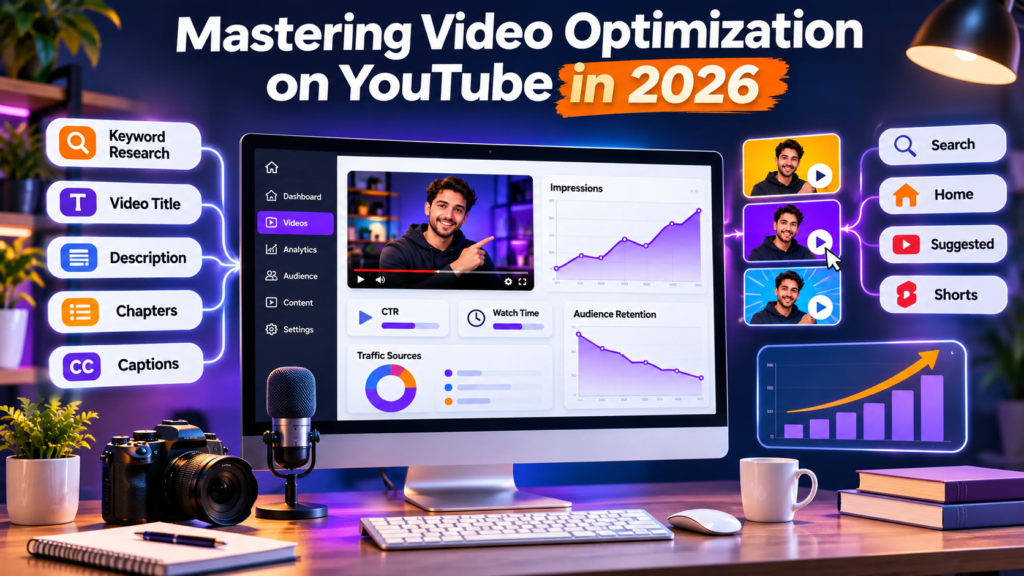
- Search: viewers type a question and YouTube matches it to videos. Relevance is the main job here.
- Home: YouTube suggests videos based on what a viewer has watched before.
- Suggested: videos shown next to or after another video.
- Shorts feed: short vertical videos shown in a continuous scroll.
Search is mostly a metadata task. Your title, description, captions, and chapters tell YouTube what the video is about. Home and Suggested are mostly a retention task. They depend on whether viewers click and keep watching.
The Click and the Watch Both Count
Your title and thumbnail earn the click. Your video earns the watch. If the title promises something the video doesn’t deliver, people leave early. That weak retention tells YouTube the video wasn’t a good match, and it gets recommended less.
YouTube has also said it looks at viewer satisfaction signals, like survey responses, alongside watch time. In simple terms, a video that people feel was worth their time has a better chance of being shown to more people.
What Good Optimization Can Do
Well-optimized videos are easier to find, easier to click, and easier to finish. Over time, that can mean more visibility, better engagement, and more organic watch time. Nobody can promise exact numbers, because every channel and audience is different. But a clear, honest, well-structured video gives itself the best chance.
What Changed Since 2024
If you read the earlier version of this guide, here’s what’s different now.
- Title and thumbnail testing is built into YouTube Studio. The Test & Compare tool, also shown as A/B testing, lets you test up to three thumbnails, three titles, or combinations on the same video. YouTube picks the winner by watch time per impression, not just clicks. Availability can depend on your channel, so check your own Studio.
- Chapters are more useful. Clear chapters can appear as key moments in Google search results, and viewers can jump straight to the part they need.
- Tags matter less. YouTube’s help pages describe tags as playing a small role, mostly for common misspellings. Your title, thumbnail, and content do the heavy lifting.
- Viewer satisfaction is part of the picture. Watch time still matters, but it isn’t the only signal.
- AI labels are required in some cases. If your video includes realistic altered or synthetic content, YouTube asks you to disclose it in Studio.
- The Shorts feed changed in 2026. The like button became a heart, the dislike button was replaced with ‘Not interested’ options, and a Save button was added.
Common Challenges in Video Optimization
Many creators run into the same four problems.
1. Not Knowing Where to Start With SEO
YouTube SEO sounds technical, so many creators skip it. The good news is that the basics are simple, and you can learn them one step at a time. This guide walks through them.
2. Weak or Missing Metadata
Your title and description tell YouTube what your video is about. If they’re vague, YouTube has less to work with, and viewers have less reason to click.
3. Titles and Thumbnails That Don’t Match the Video
A thumbnail that looks exciting but misleads viewers might get a click, but it usually leads to quick exits. Over time, that can hurt how your videos are recommended.
4. Skipping YouTube’s Built-In Tools
Playlists, end screens, cards, chapters, and captions are all free. Many creators never use them, even though they help viewers stay longer and find more of your videos.
Step-by-Step Strategies to Optimize Your Videos
Here are the strategies that matter most in 2026. You don’t have to do everything at once. Start with the first three, then add the rest.
1. Start With Keyword Research
Good optimization starts before you record. You want to know what your audience is actually searching for.
- Use YouTube’s autocomplete. Type your topic into the search bar and note the suggestions. These are real searches.
- Check the Research tab in YouTube Studio. It shows what viewers search for and where there may be gaps in your topic area.
- Look at videos that already rank. Read their titles, descriptions, and chapters, and watch their first 30 seconds.
- Use a tool if you like. TubeBuddy, VidIQ, and Google Keyword Planner can all help you compare ideas.
Pick one main keyword for each video. Then add a few close variations for your description and chapters. Specific phrases, like ‘YouTube SEO for small channels,’ are easier to compete for than broad ones, like ‘YouTube SEO.’
2. Write Titles That Are Clear and Honest
Your title does two jobs. It tells YouTube what the video is about, and it convinces a person to click.
- Put your main keyword near the start.
- Keep it short enough to read on a phone. Around 60 characters is a safe target, so it doesn’t get cut off.
- Promise something specific that the video really delivers.
- Skip ALL CAPS and keyword stuffing. They look spammy and hurt trust.
Before filming, write three title ideas. Pick the clearest one. Then, once the video is live, you can test alternatives (see strategy 5).
3. Write Descriptions That Help People First
Write your description for a person who wants context. The first two lines matter most because they show before the ‘Show more’ button. Put your main keyword and a clear summary there.
After that, add more detail in natural language. Include chapters, links to related videos or playlists, and one clear next step, like watching another video. Don’t paste a long list of keywords. It doesn’t help viewers, and it doesn’t help your video.
4. Use Tags and Hashtags Lightly
Tags used to get a lot of attention in YouTube advice. Today they play a small role. Use a few that match your topic, including common misspellings if relevant, and move on.
Hashtags are different. The first three you add can appear above your title. Use a few that fit the video, and avoid stuffing in dozens. If you add too many, YouTube may ignore them. Never use irrelevant tags or hashtags to chase views. It confuses viewers and can lead to quick exits.
5. Design Thumbnails and Test Them
A thumbnail is often the first thing a viewer sees. A good one is easy to read at a small size.
- One focal point. A face, an object, or one clear idea.
- Strong contrast. Make sure the subject stands out from the background.
- Few words. Three to five large words are plenty.
- A consistent style. Similar colors and fonts help subscribers recognize your videos.
- Show something that really appears in the video.
Now use the testing tool. In YouTube Studio, open a video and look for Test & Compare or A/B testing. Upload up to three thumbnails, three titles, or a mix. YouTube shows each version to different viewers and picks a winner by watch time per impression.
Change one thing at a time when you can. If you change the title and the thumbnail together, you won’t know which change made the difference.
6. Add Chapters, Captions, and Transcripts
These three features help both viewers and search.
- Chapters: add at least three timestamps, starting at 0:00, each at least 10 seconds long. Give each one a clear name, like ‘How to write a title,’ not ‘Part 2.’
- Captions: automatic captions are a good start, but they aren’t perfect. Review names and technical words, or upload your own transcript.
- Accessibility: captions help people watching without sound and anyone who finds your topic hard to follow.
Chapters can also appear as key moments in Google search results. That means one video can reach people searching for different parts of your topic.
7. Build the Video for Retention
Retention is how much of your video people watch. It’s one of the strongest signals about whether your video is a good match for a viewer.
- Hook fast. Tell viewers what they’ll get in the first 15 to 30 seconds, then deliver it.
- Cut filler. Long intros, repeated points, and unrelated tangents make people leave.
- Watch your retention graph. In YouTube Studio, open a video’s analytics and find where viewers drop off. Fix that section in your next video.
- Keep audio clear. Clean sound matters more than fancy visuals for most topics.
A 10-minute video that holds half its viewers beats a 20-minute video that holds one in five. Length alone doesn’t help. Holding attention does.
8. Use Playlists, End Screens, and Cards
These tools keep people on your channel longer.
- Playlists: group related videos and give the playlist a clear title and description. Videos in a playlist play one after another.
- End screens: point to the next best video for that viewer, not just your newest upload.
- Cards: link to a related video at the moment it becomes useful.
Longer viewing sessions are good for viewers, and they tell YouTube your content works together.
9. Ask for Engagement the Right Way
Likes, comments, and shares are signals that people care about your video. A vague ‘like and subscribe’ rarely works. A specific ask does better.
- Ask a real question that viewers can answer in one sentence.
- Tell people why subscribing helps them, like ‘I post a new tutorial every Tuesday.’
- Reply to comments in the first day or two. It encourages more conversation.
Keep it natural. People can tell when an ask feels forced.
10. Optimize Shorts Differently
Shorts work differently from long videos, so treat them as their own format.
- Make the first second count. The hook decides whether people stay or swipe.
- Keep one clear idea per Short.
- Use a few relevant hashtags, and write a short caption that matches the topic.
- Point to a related long video so interested viewers have somewhere to go next.
Keep in mind that Shorts views and watch time are tracked separately from long-form watch hours.
11. Review Your Analytics Every Week
You can’t improve what you don’t measure. Open YouTube Studio once a week and check a few numbers. Our YouTube Analytics Explained guide shows where to find each one.
- Impressions click-through rate: are people clicking your thumbnail and title?
- Average view duration: are viewers staying?
- Traffic sources: where do your views come from, such as search, suggested videos, or Shorts?
- Subscribers gained per video: which videos make people want to follow you?
Look for patterns across several videos, not just one. Then change one thing, wait for results, and review again.
Where Google Ads Promotion Fits Into Your Plan
Optimization comes first. A clear title, a strong thumbnail, and a video that holds attention get more out of any promotion. Once those basics are working, some creators add Google Ads campaigns to introduce a video to relevant audiences.
Vedzzy is an independent Google Ads campaign management service. It is not affiliated with or endorsed by Google or YouTube. Campaigns use custom campaign budgets ($9 to $1,000), and the estimated TrueView views shown are based on historical CPV averages. They are estimates, not promises. Results depend on your video and on how viewers respond.
How to Check What a Campaign Delivered
You can follow campaign delivery in YouTube Studio Analytics. Open Analytics, click the Reach tab, and look at Traffic sources for YouTube advertising. Always review paid traffic and organic traffic separately, so you can see how each one behaves.
If you’d like to see how this works in practice, read How We Promote YouTube Videos Using Google Ads.
A Note on Monetization
This point matters, so we’ll say it plainly. Watch time from paid ads does not count directly toward YouTube Partner Program thresholds. What can help is reaching real viewers who then watch, like, and subscribe on their own. Organic watch time and subscribers count toward eligibility, and those depend entirely on how viewers respond to your video. For a full list of common monetization blockers, see Why Is My YouTube Channel Not Monetized.
A Simple Pre-Publish Checklist
Run through this list before you hit publish.
- One main keyword chosen, and it appears near the start of the title.
- Title is clear, honest, and short enough to read on a phone.
- Thumbnail is easy to read at a small size and matches the video.
- The first two lines of the description explain the video and include the main keyword.
- Chapters added, starting at 0:00, with clear names.
- Captions reviewed for names and technical words.
- A few relevant hashtags added, not dozens.
- Hook in the first 15 to 30 seconds.
- End screen points to the best next video.
- Added to a playlist with a clear title.
- AI disclosure checked if the video includes realistic altered or synthetic content.
Common Mistakes to Avoid
- Promising too much in the title. It might win the click, but quick exits hurt the video.
- Changing everything at once. You won’t know what worked.
- Stuffing keywords. It makes your title and description harder to read and doesn’t help.
- Ignoring old videos. Updating the title, thumbnail, description, and chapters on an older video can give it a second chance.
- Checking analytics every day. Small daily changes are mostly noise. Review weekly instead.
- Posting without a plan. Regular, consistent uploads help viewers know when to come back.
Conclusion
Video optimization on YouTube comes down to a few honest habits. Choose a topic people search for. Write a clear title and a thumbnail that matches the video. Add chapters and captions. Build the video so people want to keep watching. Then check your analytics every week and improve one thing at a time.
None of this works overnight, and nobody can promise exact results. But channels that keep refining their videos tend to build stronger visibility over time. Start with your next upload, apply the checklist above, and let your own data guide what to improve next.
Frequently Asked Questions
What is video optimization on YouTube?
It’s the process of making your video easy for YouTube to understand and easy for viewers to enjoy. That includes your title, description, thumbnail, chapters, captions, and the structure of the video itself. The goal is to help the right viewers find your video, click it, and keep watching.
Do tags still matter in 2026?
They matter much less than they used to. YouTube’s help pages describe tags as playing a small role, mostly for common misspellings. Use a few that match your topic, and spend your time on your title, thumbnail, and content instead.
How long should a YouTube title be?
There’s no strict rule, but around 60 characters is a safe target. Short titles are less likely to be cut off on a phone. Put your main keyword near the start and make a clear, honest promise.
How do I test titles and thumbnails in YouTube Studio?
Open a video in YouTube Studio and look for Test & Compare or A/B testing in the title or thumbnail area. You can add up to three versions. YouTube shows them to different viewers and picks the winner by watch time per impression. Labels can change and availability can depend on your channel, so check your own account.
Do chapters help with YouTube SEO?
Yes, they can help. Chapters make long videos easier to navigate, and clear chapter names can appear as key moments in Google search. Add at least three timestamps, start with 0:00, and use descriptive names.
How often should I check my YouTube analytics?
Once a week is enough for most creators. Daily checks mostly show small changes that don’t mean much. Look at click-through rate, average view duration, and traffic sources, and compare several videos before making changes.
Can paid promotion help my video rank higher?
Promotion doesn’t directly change search rankings, and no service can promise higher rankings. What a Google Ads campaign can do is introduce your video to relevant viewers. What happens next depends on whether those viewers watch, like, or subscribe.
Do views from Google Ads count toward YouTube Partner Program requirements?
Watch time from paid ads does not count directly toward Partner Program thresholds. Reaching real viewers can help build organic momentum, and organic watch time and subscribers count toward eligibility. Those depend on how viewers respond to your video.
How can I see what a Google Ads campaign delivered?
Open YouTube Studio, go to Analytics, click Reach, and check Traffic sources for YouTube advertising. Review paid and organic traffic separately. That way you can see how each group behaves, including average view duration.
Can I optimize videos I already published?
Yes, and it’s often worth doing. Update the title and description, test a new thumbnail, add chapters and captions, and add the video to a playlist. Change one thing at a time and give each change a week or two before judging it.

Hi, I am Jason, a digital content strategist with 8 years of experience helping YouTube creators and brands grow their channels through data-driven content decisions. I have worked with creators across niches including tech, education, and lifestyle, and specialise in translating YouTube Analytics data into actionable growth strategies.
Categories: YouTube Growth Tips