YouTube Thumbnail Update 2026: Custom Shorts Thumbnails, Ask Studio, and Best Practices
Posted on August 6, 2026 by Jason Caldwell
YouTube just made a change many creators have been asking for. On July 24, 2026, YouTube announced three new thumbnail updates. They change how creators design, pick, and make thumbnails for both Shorts and long-form videos.
These are not small tweaks. One of them, custom thumbnails for Shorts, was called “one of the most requested features from YouTube creators” by YouTube CEO Neal Mohan. Another brings AI-powered thumbnail generation right into YouTube Studio. Together, these three changes give creators more say over how their content looks before anyone clicks on it.
Do you make Shorts, long-form videos, or both? Then this update matters to you. Here is what changed, what it means for your channel, and how to use each new feature.
What YouTube Announced on July 24, 2026
YouTube shared the update on its official creator blog. CEO Neal Mohan posted it on X too. The announcement confirmed three specific changes to how thumbnails get made.
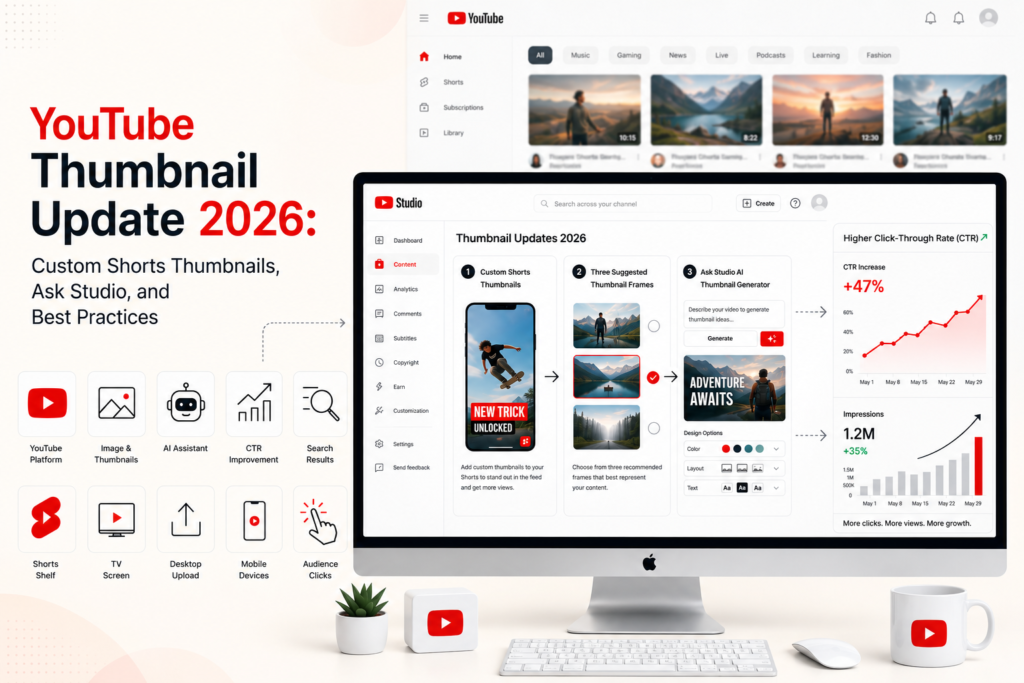
First, YouTube Partner Program creators can now upload fully custom thumbnails for Shorts. This was not possible before. It is now live for all YPP creators. YouTube says it will reach more creators over time.
Second, creators can now pick from three suggested thumbnail frames when they work on a Short from desktop. This brings Shorts in line with long-form videos, where this feature already existed.
Third, YouTube added thumbnail generation to Ask Studio for long-form videos. Creators can now ask Ask Studio to make a thumbnail for their video. Then they can refine it through a chat, by adjusting colors, layouts, and other design bits.
These are three separate features. You do not have to use all three. But knowing what each one does helps you pick which is worth your time.
Why Custom Thumbnails for Shorts Are Such a Big Deal
Before this update, Shorts creators had very little control over their thumbnails. You could pick a frame from your video. That was it. If no single frame showed the content clearly, you were stuck with a thumbnail that did not match what viewers were about to watch.
This matters more than it sounds. A thumbnail is often the first thing a viewer sees before they decide to watch. Think about the Shorts shelf. That is the row of Shorts you see on the YouTube homepage, in search results, and on connected TVs. Thumbnails now play a much bigger part in whether a viewer taps through.
YouTube’s Shorts feed shows up more and more on TV screens. TubeFilter reported that Shorts now appear on a dedicated TV spot, where sharp visuals matter a lot. A poorly framed, auto-picked thumbnail looks much worse on a 65-inch screen than it does on a phone. Custom thumbnails fix this directly.
With custom thumbnails now open to them, Shorts creators can build something better. A thumbnail that shows the content clearly. One that uses clear visuals and text. One that stands out from other content fighting for the same viewer’s eyes. This is the same edge that long-form creators have had for years. Now it applies to Shorts too.
Who Has Access Right Now
Custom thumbnails for Shorts are open to YouTube Partner Program creators for now. To join the YPP, a channel needs 1,000 subscribers and 4,000 watch hours in the past year. Or, 1,000 subscribers and 10 million Shorts views in the past 90 days.
Not in the YPP yet? YouTube says the feature will reach more creators over time. No date has been set for that yet.
How to Add a Custom Thumbnail to a New Short
Want to add a custom thumbnail to a new Short? Go through the normal upload steps in YouTube Studio. In the Details section, you will see a thumbnail upload spot. Upload the image you want to use. YouTube suggests a size of at least 1280 by 720 pixels, in a 16:9 shape. Vertical thumbnails may also work, based on how they show up in the Shorts view.
How to Add a Custom Thumbnail to an Existing Short
You can add custom thumbnails to Shorts you have already posted too. Go to YouTube Studio on desktop. Open the Content tab. Find the Short you want to change. Upload a new thumbnail image under that video. This means you can go back through your old Shorts and swap out thumbnails that were not working well.
Three Suggested Frames for Shorts on Desktop
The second update is simpler, but still useful. When you upload or edit a Short from desktop, YouTube now shows three suggested thumbnail frames pulled right from your video. You pick the one that best shows the content.
This feature already existed for long-form videos. Bringing it to Shorts cuts down on the work of scrubbing through a video by hand to find the best frame. YouTube’s system picks three frames that show different moments in the Short. These are usually clear, well-lit frames that show a person or a key visual.
This option helps when you do not have time to build a fully custom thumbnail, but you want more say than the default auto-picked frame gives you. It sits between no control and full custom design. It is a handy middle option for faster work.
On mobile, the old setup stays the same. You can still scroll through your video frame by frame and pick any moment as the thumbnail. The three-suggested-frames tool is desktop only.
Ask Studio Now Makes Thumbnails for Long-Form Videos
The third update is the most interesting from a tech standpoint. YouTube built thumbnail generation right into Ask Studio, its AI creative helper inside YouTube Studio.
Here is how it works. After you upload a long-form video, you open Ask Studio and ask it to make a thumbnail for your video. Ask Studio looks at your video’s content. Then it builds a thumbnail based on the themes, visuals, and context it finds. You can then refine the result by chatting with Ask Studio. Ask it to change the color scheme. Ask it to adjust the layout. Ask it to add text, or tweak other design bits, all through plain language.
This is a big shift in workflow for creators who spend real time building thumbnails. Instead of starting from a blank page in Canva or Photoshop, you start with a made option and refine it from there. For some creators, the made thumbnail will be close enough to use with a small tweak. For others, it will just be a starting point that still needs a lot of work.
What the MrBeast Caveat Tells You
TubeFilter noted that MrBeast’s run-in with AI thumbnails is a good reminder. Many viewers can spot and reject auto-made images. His team moved away from AI-made thumbnails after tests showed real, human-made thumbnails did better with his exact audience.
This does not mean Ask Studio thumbnails will fail for you. It means the result depends a lot on your niche, your fans, and how much you tweak the made result. A thumbnail that looks generic or fake may do worse than one that clearly shows a real moment from the video, with a strong, human touch.
Use Ask Studio as a starting point and a time-saver. Do not treat the first result as a finished product. Check first if it truly shows your video and speaks to your exact fans.
How These Updates Affect Your Click-Through Rate
Thumbnails drive your click-through rate directly. Click-through rate, or CTR, measures how often viewers click your video after they see it as a thumbnail in search, on the homepage, or in suggested feeds. A higher CTR means YouTube shows your video to more people. Why? Because more clicks tell YouTube the thumbnail and title combo is working.
For Shorts, these updates remove a gap that Shorts creators had compared to long-form creators. Long-form creators have always been able to build custom thumbnails made for clicks. Shorts creators were stuck with auto-picked frames. That gap is now closed for YPP creators.
A well-built custom thumbnail for a Short can raise the number of viewers who tap through from the Shorts shelf, search results, and TV spots. The Shorts shelf shows up more and more on YouTube’s homepage and TV screen. So this jump in visual control has a real, direct effect on how easily people find your videos.
For long-form creators, the Ask Studio tool cuts the time cost of building thumbnails. Less time spent on design means more time for other parts of making content. Scripting. Filming. Editing. Or building your YouTube audience retention through a better video structure.
Thumbnail Best Practices That Still Apply in 2026
These new tools make thumbnail work easier. But the rules for a good thumbnail have not changed.
Clarity Over Cleverness
Your thumbnail needs to show what the video is about at a glance. Viewers decide in a split second. A clever or odd thumbnail that takes thought to figure out will lose viewers. Those viewers would have clicked on something clear right away.
The best thumbnails show one clear subject. Usually a face with a strong look, a product, or a before-and-after shot. Add a small bit of text that backs up the promise of the title.
Design for Small Sizes First
Many viewers see thumbnails at small sizes: on phones, in sidebar suggestions, on the Shorts shelf. A thumbnail that looks great full-size but turns unreadable when small will do worse.
Build your thumbnails at full size. But always check them at thumbnail size before you finish. Text that reads fine at 1280 by 720 pixels may turn unreadable at 200 by 112 pixels. Use big, bold text. Make sure the main visual is clear even when small.
Recommended Thumbnail Sizes for 2026
YouTube’s updated thumbnail advice calls for 3840 by 2160 pixels, in a 16:9 shape, for long-form videos. This is a higher size than past years. It reflects how much YouTube viewing now happens on big TV screens, where soft thumbnails stand out more as a problem.
For normal uploads, 1280 by 720 pixels still works fine. File size limits are 2 MB for mobile uploads and 50 MB for desktop uploads.
For Shorts thumbnails, design for a vertical look. A 9:16 shape works better in the Shorts view than a standard 16:9 thumbnail.
Use High Contrast and Bright Colors
Thumbnails compete against a full page of other thumbnails. High contrast between the subject and the background helps a lot. So do bright colors that pop against YouTube’s white layout. These both drive higher click-through rates than muted or flat designs.
Test your thumbnail against other content in your niche. Pull up YouTube search results for your topic. Look at the thumbnails that show up. Does yours stand out? Is it clear at a glance what the video is about? If it blends in, or you need to read the title to get it, your thumbnail needs more visual punch.
How This Connects to Broader Channel Growth
Thumbnail work is one piece of a bigger content picture. A stronger thumbnail gets more clicks. More clicks give the YouTube algorithm more data to work with. More data means the algorithm can more safely send your content to the right fans. That builds real growth that compounds over time.
But CTR only starts the process. Once a viewer clicks, your content needs to hold them there. A thumbnail that overpromises leads to viewers clicking, then leaving right away. That is a bad signal that the algorithm uses to limit how far it pushes your video next.
The best thumbnail plan in 2026 is one where the thumbnail truly matches the content, and sparks real curiosity in the right viewer. Not just any viewer. The one most likely to watch to the end, engage with your video, and come back for more.
Do you also use paid ads to build early momentum on new videos? Then strong thumbnails matter even more. When a promoted video reaches a targeted crowd through affordable YouTube promotion packages, a strong thumbnail raises the odds that those viewers click through from discovery spots. The thumbnail and the promotion work as a team. One reaches the right fans. The other turns that reach into real views.
Frequently Asked Questions
Who can use custom thumbnails for YouTube Shorts right now?
Custom Shorts thumbnails are open to YouTube Partner Program creators for now. You need 1,000 subscribers, plus either 4,000 watch hours in the past year, or 10 million Shorts views in the past 90 days, to join. YouTube says the feature will reach more creators over time, but has not set a clear date.
Can I add a custom thumbnail to a Short I already uploaded?
Yes. Go to YouTube Studio on desktop, open the Content tab, find the Short you want to change, and upload a new thumbnail image. You can add custom thumbnails to old Shorts, no need to re-upload the video.
What size should a YouTube Shorts thumbnail be?
Build Shorts thumbnails in a 9:16 vertical shape to match how Shorts look. Use at least 1280 by 720 pixels. For top quality on TV screens, YouTube now suggests 3840 by 2160 pixels for 2026. File size limits are 2 MB on mobile and 50 MB on desktop.
What is Ask Studio and how does it make thumbnails?
Ask Studio is YouTube’s AI creative helper inside YouTube Studio. After you upload a long-form video, you can open Ask Studio and ask it to make a thumbnail based on your video’s content. You then refine the result by chatting with Ask Studio, asking for changes to colors, layouts, text, and other design bits, all in plain language.
Does the three-suggested-frames feature work on mobile?
No. The three-suggested-frames tool for Shorts is desktop only. On mobile, you can still scroll through your video and pick any frame as the thumbnail. This gives you more fine-tuned control than the suggested frames, but takes more manual work.
Will these thumbnail updates improve my click-through rate?
Custom thumbnails give you more say over how your Shorts look in search results, on the Shorts shelf, and on TV screens. A clearer picture of your content raises the odds that the right viewer clicks. Does your CTR actually improve? That depends on the quality of the thumbnail you build. The tool gives you control. The design still decides the result.
Are Ask Studio thumbnails good enough to use without editing?
It depends on your video and niche. AI-made thumbnails work as a starting point and time-saver. For some creators with simple content, the made result may need just small tweaks. Do you have a specific brand? Do your fans expect a certain look? Does your content need real imagery? If so, the made thumbnail will likely need a lot more work before it truly fits your video.
When will custom Shorts thumbnails be available to non-YPP creators?
YouTube says the feature will reach more creators over time, but has not given a set date or goal. Non-YPP creators still have options. Pick any frame from your video on mobile. Or choose from three suggested frames on desktop. This works while you wait for full custom thumbnail access.
What to Do Right Now
Are you already in the YouTube Partner Program? Go to YouTube Studio today. Try adding custom thumbnails to your three most-viewed Shorts. Check how they do over the next two weeks against how those same Shorts did before the change.
Do you have long-form videos in YouTube Studio? Try the Ask Studio thumbnail tool on one video to see what the output looks like for your own content. Use it as a first draft, then refine it from there.
These tools are live now. The creators who try them first will have the most data to work with as the full rollout continues.

Hi, I am Jason, a digital content strategist with 8 years of experience helping YouTube creators and brands grow their channels through data-driven content decisions. I have worked with creators across niches including tech, education, and lifestyle, and specialise in translating YouTube Analytics data into actionable growth strategies.
Categories: YouTube, YouTube Growth Tips